一点经验网
首页
美食营养
生活百科
知识问答
生活知识
返回
一点经验网
首页
美食营养
游戏数码
手工爱好
生活知识
生活百科
健康养生
运动户外
职场理财
情感交际
母婴教育
时尚美容
知识问答
更多知识
搜索
iPhone11怎么关闭App请求跟踪
2026-05-03 05:02:21
1、首先打开苹果手机的【设置】。
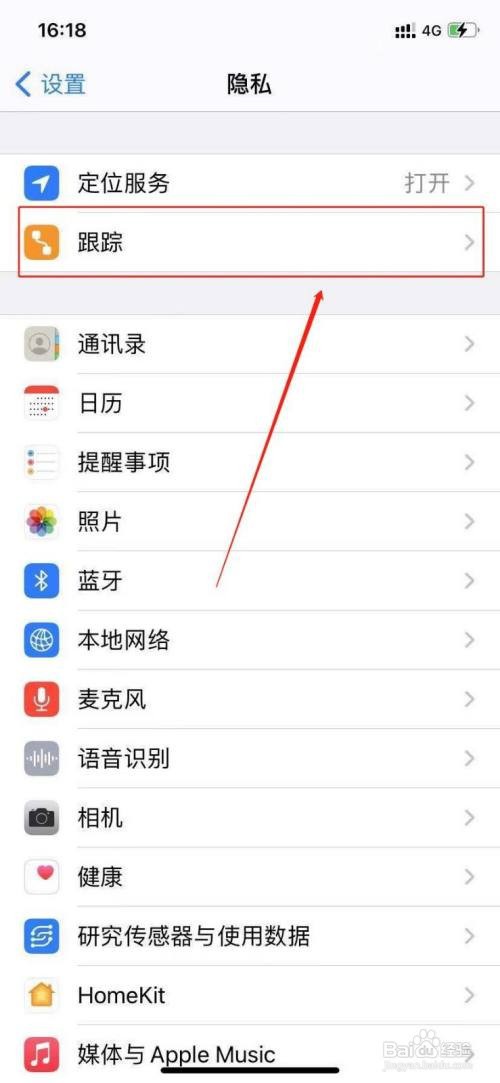
2、进入手机设置之后,点击【隐私】选项。
3、接着点击【跟踪】。
4、最后在打开的界面中,将【允许App请求跟踪】关闭即可。
相关推荐
苹果手机铃声音量自动变小怎么回事
阅读量:141
iphone14手机如何设置电话降噪
阅读量:184
苹果手机自动调节亮度怎么设置
阅读量:165
苹果手机怎么关闭系统触感反馈
阅读量:127
苹果12如何去掉锁屏界面右上方的小横条
阅读量:109
猜你喜欢
下川岛旅游攻略
深圳世界之窗攻略
三国志12怎么玩
成都到九寨沟旅游攻略
耄耋之年怎么读
白莲攻略
油性皮肤怎么护理
左旋减肥咖啡
幸福攻略
火影忍者羁绊攻略
猜你喜欢
未婚证明怎么写
逃生攻略
旅游攻略网
阿玛尼的手表怎么样
金领冠珍护怎么样
怎么用ps拼图
怎样运动减肥
怎么练习英语听力
倩女幽魂跑商攻略
脚后跟疼是怎么治疗