OpenCV:FileStorage类数据存取操作
1、FileStorage类:
FileStorage类将各种OpenCV数据结构的数据存储为XML 或 YAML格式;
同时,也可以将其他类型的数值数据存储为这两种格式;
FileStorage类构造函数:
格式:
FileStorage(const string& source,
int flags,
const string& encoding=string());
参数:
source-存储或读取数据的文件名,其扩展名(.xml或.yml/.yaml)决定文件格式。
flags-操作模式,包括:
FileStorage::READ 打开文件进行读操作
FileStorage::WRITE 打开文件进行写操作
FileStorage::APPEND打开文件进行附加操作
FileStorage::MEMORY 从source读数据,或向内部缓存写入数据(由FileStorage::release返回)
encoding-文件编码方式;目前不支持UTF-16 XML 编码,应使用 8-bit 编码。

2、写数据operator <<:
功能:向filestorage中写入数据;
格式:
template<typename_Tp> FileStorage& operator<<(FileStorage& fs, const _Tp& value)
template<typename_Tp> FileStorage& operator<<(FileStorage& fs, const vector<_Tp>& vec)
参数:
fs-用于写数据的file storage对象;
value-待写入fs的数据;
vec-待写入fs的向量值;

3、FileStorage::open:
功能:打开一个文件;
格式:
bool FileStorage::open(const string& filename,
int flags,
const string&encoding=string())
参数:
filename-待打开的文件名,其扩展名(.xml或.yml/.yaml) 决定文件格式;
flags-操作模式,包括:
包括:
FileStorage::READ 打开文件进行读操作
FileStorage::WRITE 打开文件进行写操作
FileStorage::APPEND打开文件进行附加操作
FileStorage::MEMORY 从source读数据,或向内部缓存写入数据(由FileStorage::release返回)
encoding-文件编码方式;
示例:
// open a file
cv::FileStorage fs;
fs.open("test.yml",FileStorage::WRITE);
// ... some process here
fs.release();

4、FileStorage::isOpened:
功能:检查文件是否已经打开;
格式:bool FileStorage::isOpened()
返回:
ture-如果对象关联了当前文件;
false-其他情况;
FileStorage::release:
功能:存储或读取操作完成后,需要关闭文件并释放缓存,
格式:void FileStorage::release()
示例:
// Checks whether the file is opened
cv::FileStorage fs;
fs.open("test.yml",FileStorage::WRITE);
bool flag = fs.isOpened();
cout<<"flag = "<<flag<<endl<<endl;
// if failed to open a file
if(!fs.isOpened())
{
cout<<"failed to open file test.yml "<<endl<<endl;
return 1;
}
fs.release();

5、FileStorage::getFirstTopLevelNode:
功能:返回映射(mapping)顶层的第一个元素:
格式:FileStorage::getFirstTopLevelNode()
示例:
// open a file for reading
fs.open("test.yml", FileStorage::READ);
// get the first top level node
int firstNode = fs.getFirstTopLevelNode();
cout<<"the First Top Level Node = "<<firstNode<<endl<<endl;
FileStorage::root:
功能:返回顶层映射(mapping)
格式:FileNode FileStorage::root(int streamidx=0)
参数:
streamidx-从0开始的字符串索引,大部分情况文件中只有一个串,但YAML支持多个串,因此可以有多个。
Returns: 顶层映射
FileStorage::operator[]
功能:返回指定的顶层映射元素
FileNode FileStorage::operator[](const string& nodename) const
FileNode FileStorage::operator[](const char* nodename) const
参数:
nodename-文件节点名;
返回:名称为nodename的节点数据;

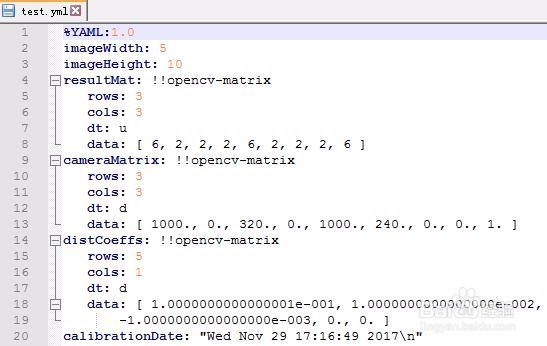
6、示例一:写操作;
#include <opencv2\opencv.hpp>
#include <time.h>
using namespace std;
using namespace cv;
void main()
{
// 1.create our writter
FileStorage fs("test.yml", FileStorage::WRITE);
// 2.Save an int
int imageWidth= 5;
int imageHeight= 10;
fs << "imageWidth" << imageWidth;
fs << "imageHeight" << imageHeight;
// 3.Write a Mat
cv::Mat m1= Mat::eye(3,3, CV_8U);
cv::Mat m2= Mat::ones(3,3, CV_8U);
cv::Mat resultMat= (m1+1).mul(m1+2);
fs << "resultMat" << resultMat;
// 4.Write multi-variables
cv::Mat cameraMatrix = (Mat_<double>(3,3) << 1000, 0, 320, 0, 1000, 240, 0, 0, 1);
cv::Mat distCoeffs = (Mat_<double>(5,1) << 0.1, 0.01, -0.001, 0, 0);
fs << "cameraMatrix" << cameraMatrix << "distCoeffs" << distCoeffs;
// 5.Save local time
time_t rawtime; time(&rawtime); //#include <time.h>
fs << "calibrationDate" << asctime(localtime(&rawtime));
// 6.close the file opened
fs.release();
}
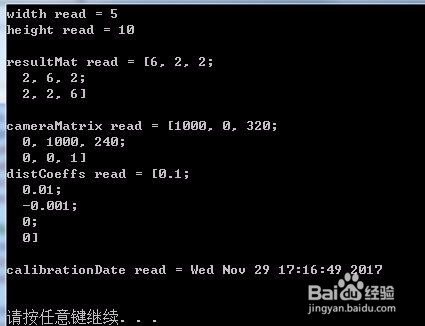
7、示例二:读操作
#include <opencv2\opencv.hpp>
#include <time.h>
using namespace std;
using namespace cv;
void main()
{
// read data using operator []
cv::FileStorage fs("test.yml", FileStorage::READ);
int width;
int height;
fs["imageWidth"]>>width;
fs["imageHeight"]>>height;
cout<<"width read = "<<width<<endl;
cout<<"height read = "<<height<<endl<<endl;
// read Mat
cv::Mat resultMatRead;
fs["resultMat"]>>resultMatRead;
cout<<"resultMat read = "<<resultMatRead<<endl<<endl;
cv::Mat cameraMatrixRead,distCoeffsRead;
fs["cameraMatrix"]>>cameraMatrixRead;
fs["distCoeffs"]>>distCoeffsRead;
cout<<"cameraMatrix read = "<<cameraMatrixRead<<endl;
cout<<"distCoeffs read = "<<distCoeffsRead<<endl<<endl;
// read string
string timeRead;
fs["calibrationDate"]>>timeRead;
cout<<"calibrationDate read = "<<timeRead<<endl<<endl;
fs.release();
system("pause");
}