一点经验网
首页
美食营养
生活百科
知识问答
生活知识
返回
一点经验网
首页
美食营养
游戏数码
手工爱好
生活知识
生活百科
健康养生
运动户外
职场理财
情感交际
母婴教育
时尚美容
知识问答
更多知识
搜索
mac电脑怎么关闭shift键启用粘滞键的功能?
2026-04-23 03:52:58
1、打开系统偏好设置。
2、点击辅助功能。
3、点击键盘。
4、点击选项。
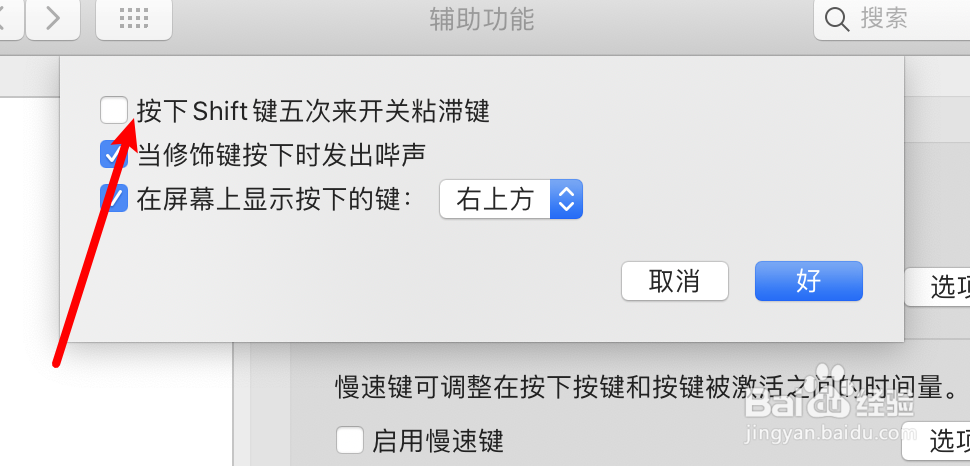
5、取消选中shift键启用粘滞键的选项。
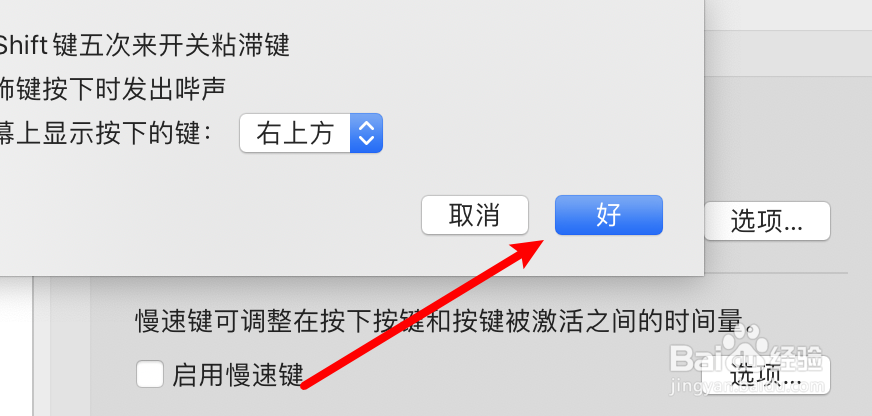
6、点击‘好’按钮。
相关推荐
MacBook 要不要贴膜
阅读量:51
mac信息怎么设置播放声音效果
阅读量:84
苹果mac无法观看网页视频如何解决
阅读量:44
Mac电脑程序坞中的文件夹功能小技巧
阅读量:142
如何关闭苹果电脑Mac系统自动更新升级提醒
阅读量:24
猜你喜欢
干煸牛肉的做法
没关系用英语怎么说
土豆鸡蛋饼的做法
馄饨皮的做法大全
芹菜饺子的做法
鹦鹉怎么养
猪排骨的做法大全
夔怎么读
蛞蝓怎么读
剁椒酱的做法
猜你喜欢
蒸鸡的做法
红烧肘子的家常做法
洗衣机怎么用
酸菜汆白肉的做法
富贵包怎么形成的有什么危害
咖喱牛肉的做法
甲亢怎么治疗
我的世界村民怎么繁殖
美食小吃做法大全
洋葱炒蛋的做法