mac系统怎么关闭siri键盘快捷键?
1、在系统开始菜单,选择【系统便好设置】选项。
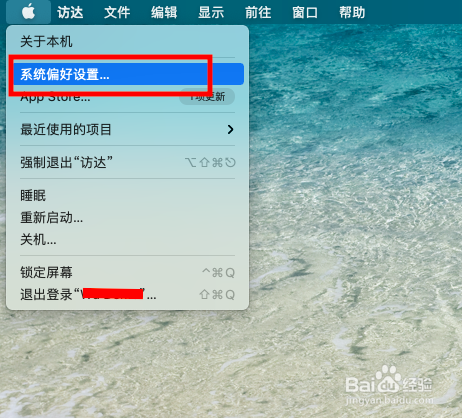
2、在系统便好设置页面,打开【Siri】选项。

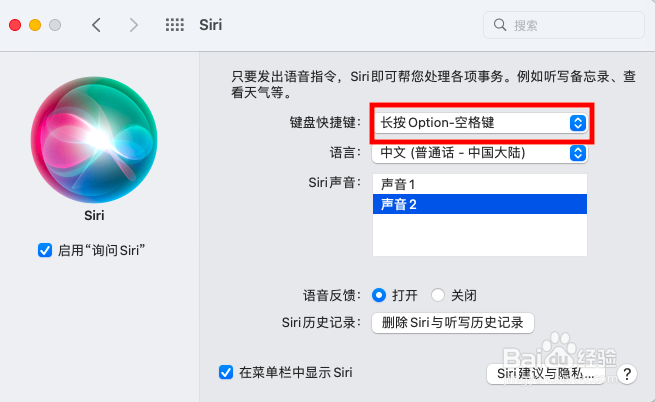
3、在Siri设置页面,打开【键盘快捷键】设置项。
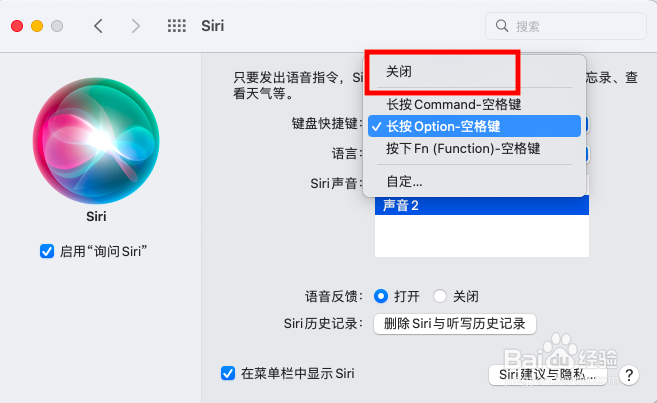
4、在打开的键盘快捷键选择列表,选择【关闭】选项即可。
阅读量:187
阅读量:130
阅读量:24
阅读量:101
阅读量:112
1、在系统开始菜单,选择【系统便好设置】选项。
2、在系统便好设置页面,打开【Siri】选项。
3、在Siri设置页面,打开【键盘快捷键】设置项。
4、在打开的键盘快捷键选择列表,选择【关闭】选项即可。