MangaMeeya使用放大镜时如何暂停菜单工具栏显示
1、点击“MangaMeeya”

2、在“MangaMeeya”窗口中,点击“工具”
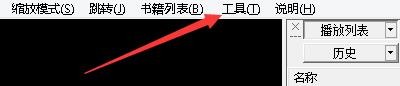
3、在弹出下拉栏中,点击“环境设置”

4、在“环境设置”窗口中,点击“一般设置2”

5、在“一般设置2”窗口中,勾选“使用放大镜时,暂停菜单、工具栏显示”

6、点击“应用”,点击“确定”即可

阅读量:156
阅读量:164
阅读量:195
阅读量:176
阅读量:173
1、点击“MangaMeeya”
2、在“MangaMeeya”窗口中,点击“工具”
3、在弹出下拉栏中,点击“环境设置”
4、在“环境设置”窗口中,点击“一般设置2”
5、在“一般设置2”窗口中,勾选“使用放大镜时,暂停菜单、工具栏显示”
6、点击“应用”,点击“确定”即可