IntelliJ IDEA怎么开启双击选择时允许单词设置
1、首先,打开一个的IntelliJ IDEA的界面中

2、点击了IntelliJ IDEA的菜单中的一个 file 菜单

3、点击了file的菜单之后,弹出了下拉菜单选中为 settings 选项

4、进入到了settings界面中,选中 general 选项

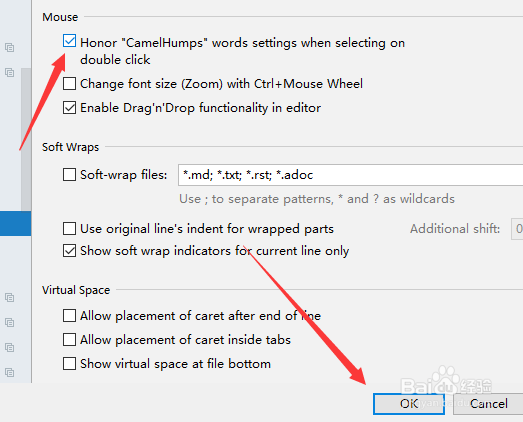
5、选中 general 选项,勾选上 honor words settings when selecting 选项

6、勾选上 honor words settings when selecting 选项,点击 ok 来保存设置。
阅读量:131
阅读量:47
阅读量:122
阅读量:155
阅读量:91