华为mate40如何关闭悬浮导航?
1、在手机设置菜单中点击【系统和更新】。

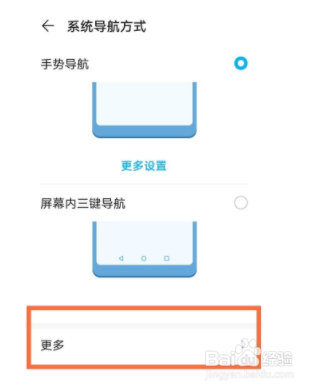
2、点击【系统导航方式】。

3、点击【更多】。
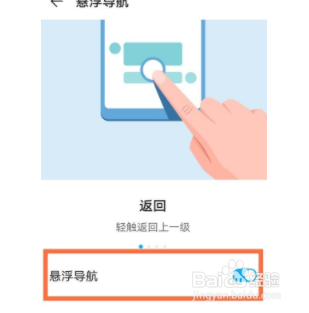
4、关闭【悬浮导航】右侧开关

5、显示灰色即可设置成功。
1、步骤分享:
1、在手机设置菜单中点击【系统和更新】。
2、点击【系统导航方式】。
3、点击【更多】。
4、关闭【悬浮导航】右侧开关,显示灰色即可设置成功。
阅读量:89
阅读量:160
阅读量:67
阅读量:176
阅读量:108
1、在手机设置菜单中点击【系统和更新】。
2、点击【系统导航方式】。
3、点击【更多】。
4、关闭【悬浮导航】右侧开关
5、显示灰色即可设置成功。
1、步骤分享:
1、在手机设置菜单中点击【系统和更新】。
2、点击【系统导航方式】。
3、点击【更多】。
4、关闭【悬浮导航】右侧开关,显示灰色即可设置成功。