ps5手柄怎么和电脑进行配对

2026-02-12 14:16:40

1、长按5秒ps5左上角按钮及中心按钮,等待中心区域闪烁,ps5进入配对模式。

ps5手柄怎么和电脑进行配对

2、打开电脑,在windows设置界面点击设备。

ps5手柄怎么和电脑进行配对

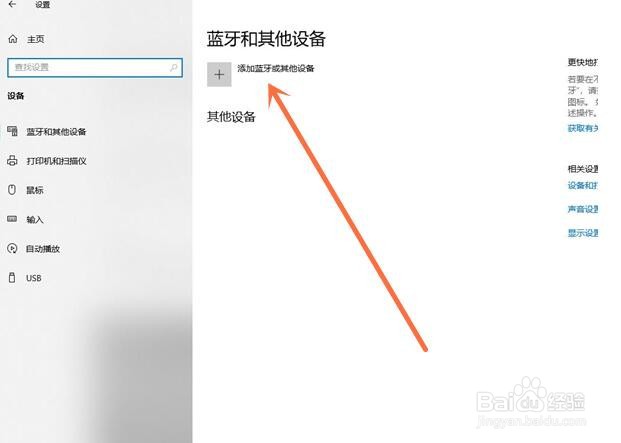
3、点击添加蓝牙和其他设备。

ps5手柄怎么和电脑进行配对

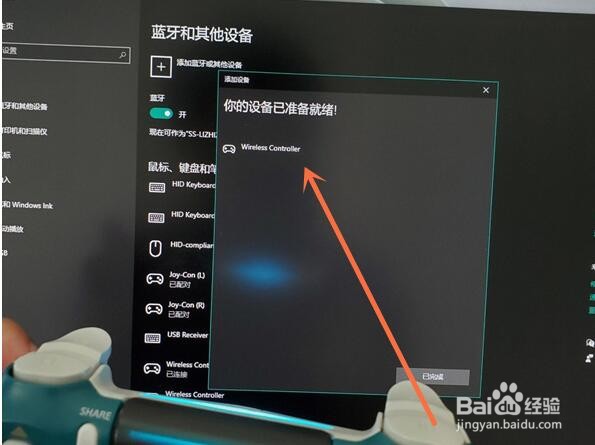
4、再点击蓝牙,会搜索到设备,点击设备名称即可连接。

ps5手柄怎么和电脑进行配对

ps5手柄怎么和电脑进行配对

相关推荐
  • 阅读量:65
  • 阅读量:187
  • 阅读量:47
  • 阅读量:140
  • 阅读量:140
  • 猜你喜欢