流量卡apn怎么设置
1、打开“移动网络”
点开菜单“设置”,在“设置”页面找到“移动网络”选项,点击打开。

2、点击“接入点APN”
找到“接入点APN”并点击进入。

3、选择“新增接入点”
选择“新增接入点”选项。

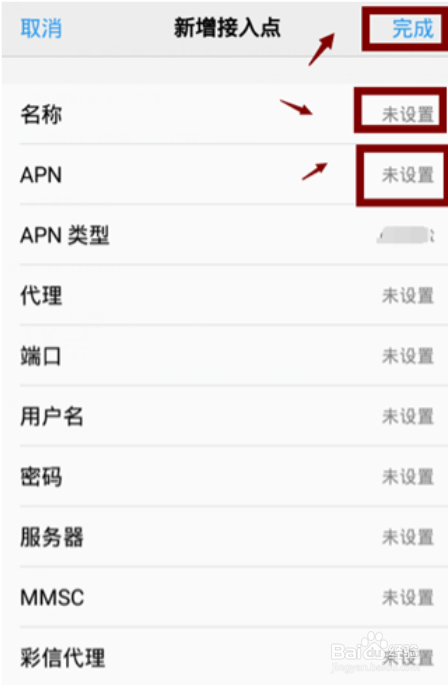
4、添加无限流量卡名称和APN
在“新增接入点”界面添加无限流量卡名称和APN, 并保存(中国电信流量卡和APN为CTNET;中国移动流量卡和APN为CMNET,CMMET,CMIOT,具体需要与移动运营商咨询)。
1、打开“移动网络”
点开菜单“设置”,在“设置”页面找到“移动网络”选项,点击打开。
2、点击“接入点APN”
找到“接入点APN”并点击进入。
3、选择“新增接入点”
选择“新增接入点”选项。
4、添加无限流量卡名称和APN
在“新增接入点”界面添加无限流量卡名称和APN, 并保存(中国电信流量卡和APN为CTNET;中国移动流量卡和APN为CMNET,CMMET,CMIOT,具体需要与移动运营商咨询)。