PowerPoint2003怎样制作不停闪烁的文字
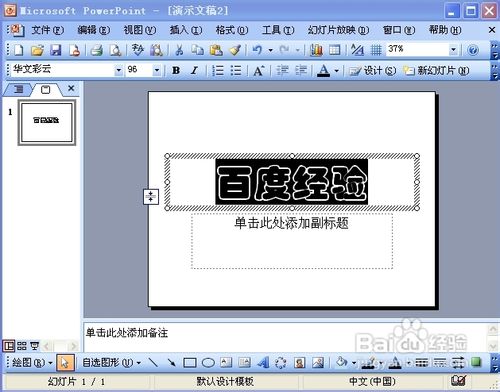
1、先选中需要设置闪烁的文字。
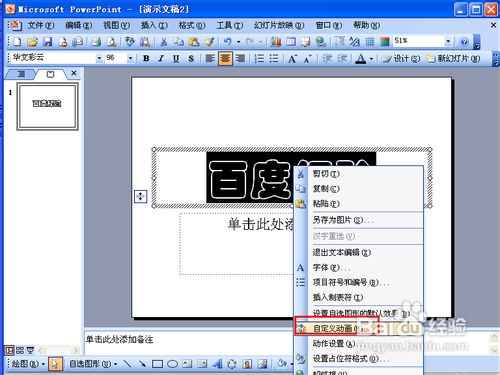
2、然后右击,在弹出菜单中选择“自定义动画”。
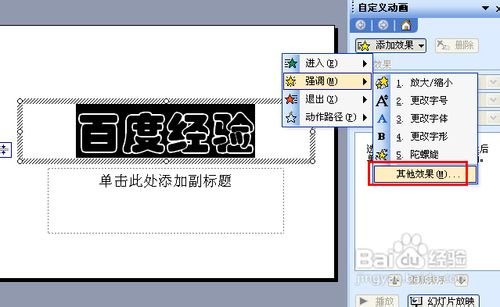
3、然后点击添加效果——强调——其他效果。
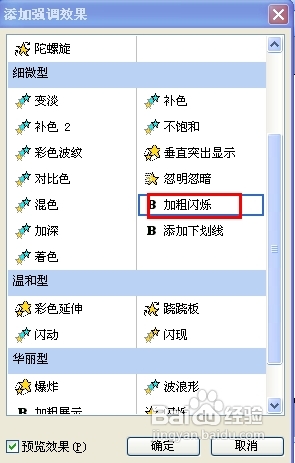
4、在添加弹调效果中选择“加粗闪烁”,点确定。
5、然后在修改属性的下拉菜单中选择“计时”。
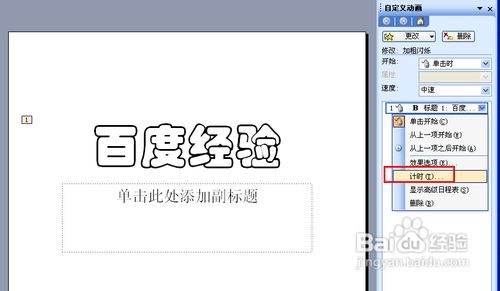
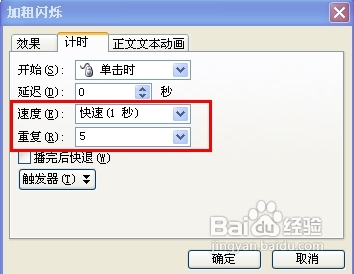
6、将速度选择1秒,选择需要重复闪烁的次数,按确定即可。
阅读量:126
阅读量:78
阅读量:195
阅读量:88
阅读量:175
1、先选中需要设置闪烁的文字。
2、然后右击,在弹出菜单中选择“自定义动画”。
3、然后点击添加效果——强调——其他效果。
4、在添加弹调效果中选择“加粗闪烁”,点确定。
5、然后在修改属性的下拉菜单中选择“计时”。
6、将速度选择1秒,选择需要重复闪烁的次数,按确定即可。