一点经验网
首页
美食营养
生活百科
知识问答
生活知识
返回
一点经验网
首页
美食营养
游戏数码
手工爱好
生活知识
生活百科
健康养生
运动户外
职场理财
情感交际
母婴教育
时尚美容
知识问答
更多知识
搜索
Illustrator渐变蒙版效果制作
2026-04-22 07:15:33
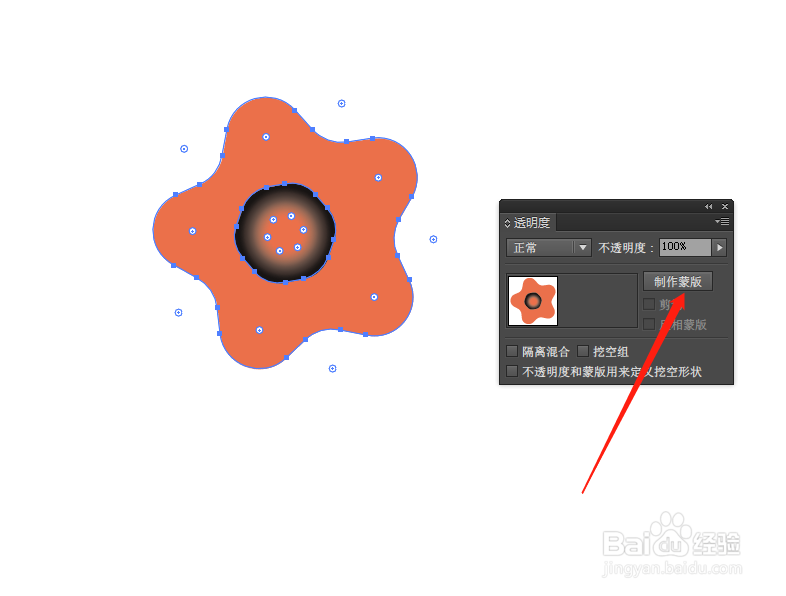
1、打开Illustrator,绘制两个交叠的图形。
2、中间的图形设置黑白渐变效果。
3、同时选中两个图形,在透明度面板中点击制作蒙版。
4、如图,渐变蒙版效果就制作好了。
相关推荐
ai怎么换底色
阅读量:27
ai字体怎么渐变
阅读量:27
ai怎么编组
阅读量:47
AI如何制作投影效果
阅读量:129
ai字体怎么渐变
阅读量:159
猜你喜欢
年糕怎么做好吃
knife怎么读
云闪付怎么用
台式电脑怎么连wifi
骑缝章怎么盖
蹇怎么读
流鼻血怎么办
bread怎么读
藏书羊肉的做法
胡萝卜饺子馅的做法
猜你喜欢
莲雾怎么吃
橄榄油怎么吃
怎么恢复微信聊天记录
小米电视怎么样
遗嘱怎么写法律才有效
为什么要上大学
排骨怎么做好吃
华为怎么分屏
圣诞节用英语怎么说
早餐食谱大全及做法