一点经验网
首页
美食营养
生活百科
知识问答
生活知识
返回
一点经验网
首页
美食营养
游戏数码
手工爱好
生活知识
生活百科
健康养生
运动户外
职场理财
情感交际
母婴教育
时尚美容
知识问答
更多知识
搜索
哔哩哔哩app怎么设置空间不要显示玩过的游戏?
2026-04-25 01:37:39
1、打开应用。
2、点击上方的横线。
3、点击设置。
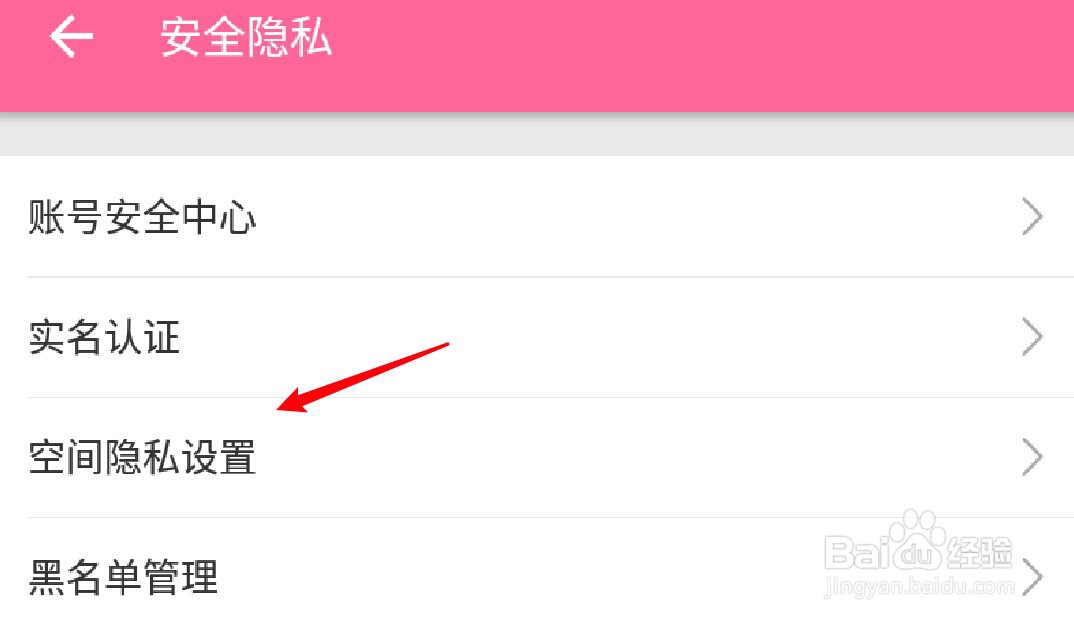
4、点击安全隐私。
5、点击空间隐私设置。
6、点击关闭显示玩过的游戏的开关。
相关推荐
战争与文明怎样采集果树
阅读量:149
花亦山心之月怎么导入脸型
阅读量:183
哔哩哔哩怎么进行消息设置?
阅读量:113
如何在AWS免费主机上安装配置宝塔面板
阅读量:20
如何查看节奏大师小师妹的技能
阅读量:92
猜你喜欢
猪肚包鸡的做法
荨麻疹怎么样治疗
寿司做法
晋怎么读
茼蒿的做法大全家常
可乐鸡翅的家常做法
炖羊肉的做法
倦怎么组词
甲鱼汤的做法大全
八宝饭的家常做法
猜你喜欢
关东煮的做法及配方
猪肚汤的做法大全
盱眙怎么读
鸭汤的做法大全
虾仁的做法大全
揖怎么读
冰箱冷藏室排水孔堵塞怎么疏通
预产期怎么算
带鱼的做法大全
青春痘怎么快速消除