一点经验网
首页
美食营养
生活百科
知识问答
生活知识
返回
一点经验网
首页
美食营养
游戏数码
手工爱好
生活知识
生活百科
健康养生
运动户外
职场理财
情感交际
母婴教育
时尚美容
知识问答
更多知识
搜索
Illustrator 2020怎么设置键盘增量为3pt
2026-05-07 12:26:37
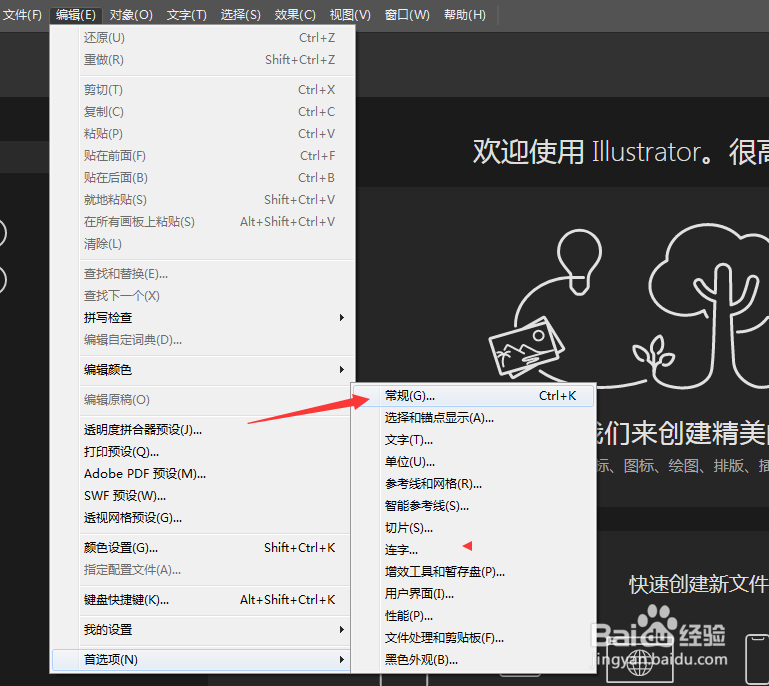
1、点击菜单中的工具菜单,弹出了下拉菜单选中为首选项
2、点击常规选项
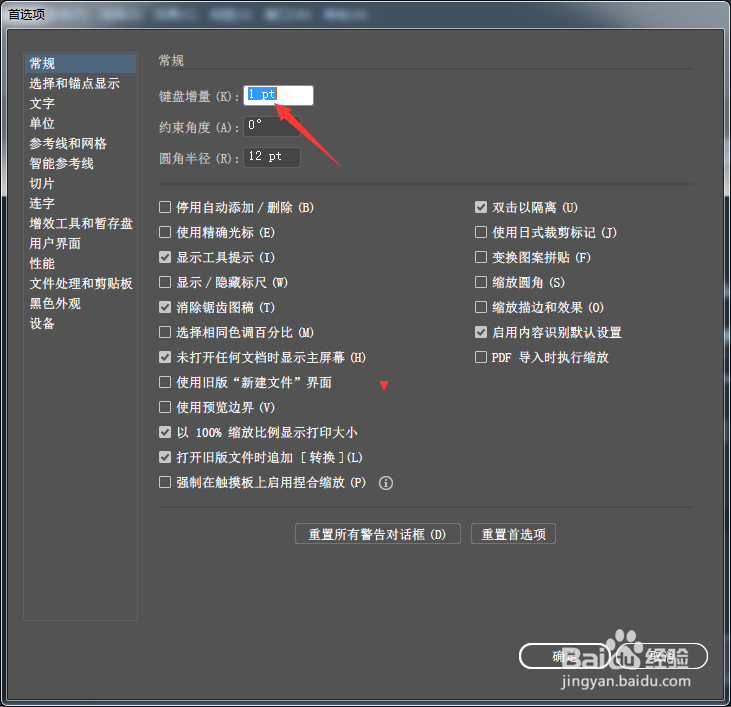
3、在键盘增量中输入3pt
4、在键盘增量中输入3pt选项之后,点击确定
相关推荐
AI如何给形状添加蒙版?
阅读量:143
AI字体的安装方法
阅读量:147
AI如何导出高清大图
阅读量:123
用AI,怎么把图片设置成300dpi
阅读量:167
ps怎么导入ai
阅读量:80
猜你喜欢
庆余年 小说简介
陕西旅游攻略
巽寮湾旅游攻略
酒糟鼻怎么形成的
红烧羊排的做法
减肥精油
减肥健身食谱
武夷山旅游攻略
海伦凯勒简介
华少怎么了
猜你喜欢
工装裤搭配
本人成分怎么填
天津五大道旅游攻略
吃什么才能减肥
减肥瘦身食谱
减肥药排行榜第一名
新轩逸怎么样
怎么画动漫人物的手
红烧大排怎么做
怎样减肥最快