centos7.2离线安装ambari2.6.0和hdp2.6.3全过程
1、通过ambari安装需要下载下面的三个主要包:
HDP-2.6.3.0-centos7-rpm.tar.gz
ambari-2.6.0.0-centos7.tar.gz
HDP-UTILS-1.1.0.21-centos7.tar.gz

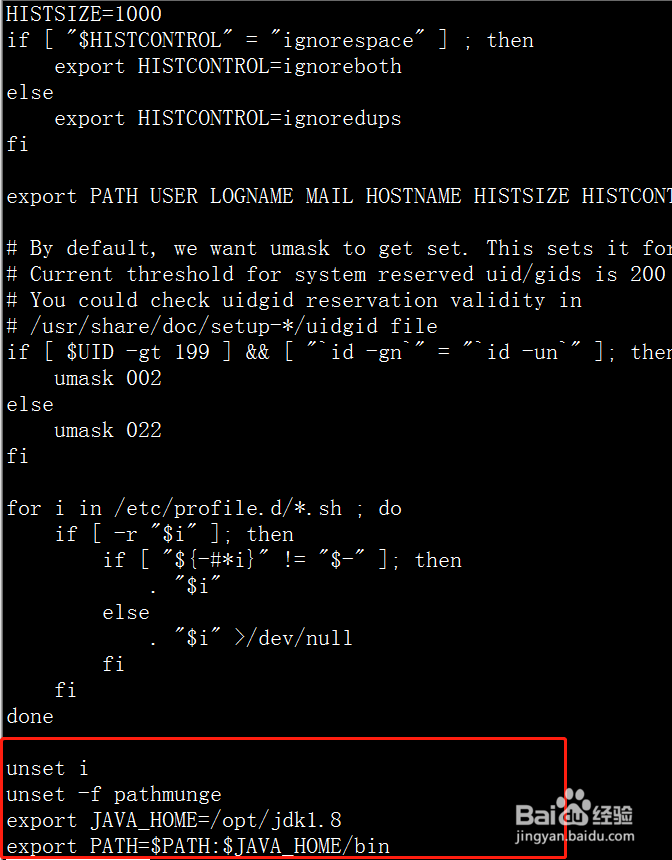
2、所有机器安装JDK,并设置环境变量
vi /etc/profile
export JAVA_HOME=/opt/jdk1.8
export PATH=$PATH:$JAVA_HOME/bin
source /etc/profile
3、修改本机名(所有机器)
vi /etc/hostname
各个节点修改成相应的名称,分别为hdp1,hdp2,hdp3

4、修改/etc/hosts文件(所有机器)
vi /etc/hosts
192.168.5.223 hdp1
192.168.5.224 hdp2
192.168.5.225 hdp3

5、修改/etc/sysconfig/network(所有机器)
vi /etc/sysconfig/network
NETWORKING=yes

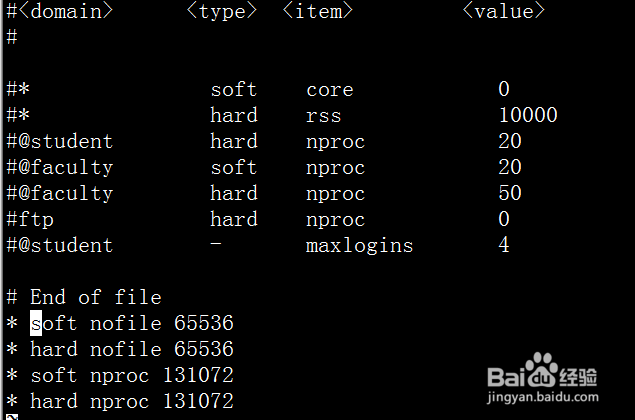
6、修改文件打开限制(所有机器)
vi /etc/security/limits.conf
# End of file
* soft nofile 65536
* hard nofile 65536
* soft nproc 131072
* hard nproc 131072
7、关闭防火墙(所有机器)
systemctl disable firewalld
systemctl stop firewalld

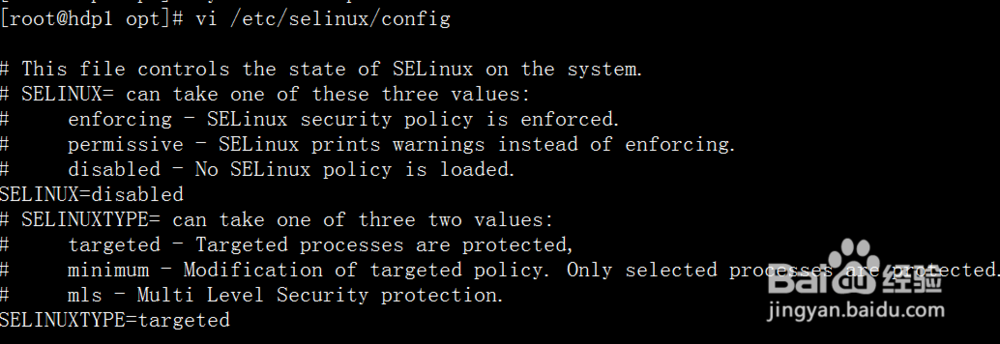
8、设置SELINUX=disabled
vi /etc/selinux/config
SELINUX=disabled
9、修改时区为亚洲上海时区
cp /usr/share/zoneinfo/Asia/Shanghai /etc/localtime

10、设置时间同步
安装ntp服务(所有机器)
yum -y install ntp
设置hdp1为主服务器,开启nptd服务(主服务器)
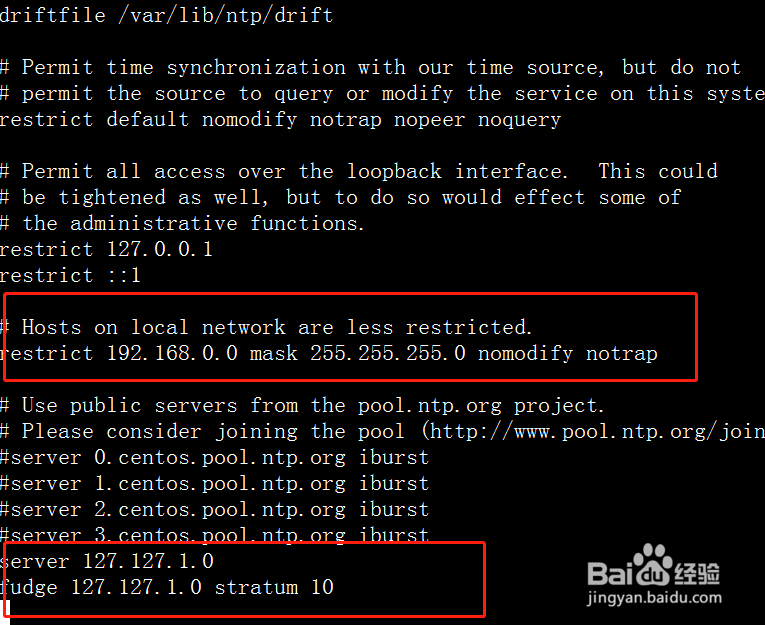
vi /etc/ntp.conf
仿照下图红色部分,修改如下内容
restrict 192.168.0.0 mask 255.255.255.0 nomodify notrap
server 127.127.1.0
fudge 127.127.1.0 stratum 10
11、systemctl start ntpd.service #启动服务
systemctl enable ntpd.service #开机自启动
子节点设置同步(子节点),任意选择一种
方式1:设置定时程序
crontab -e
0-59/10 * * * * /usr/sbin/ntpdate hdp1
方式二
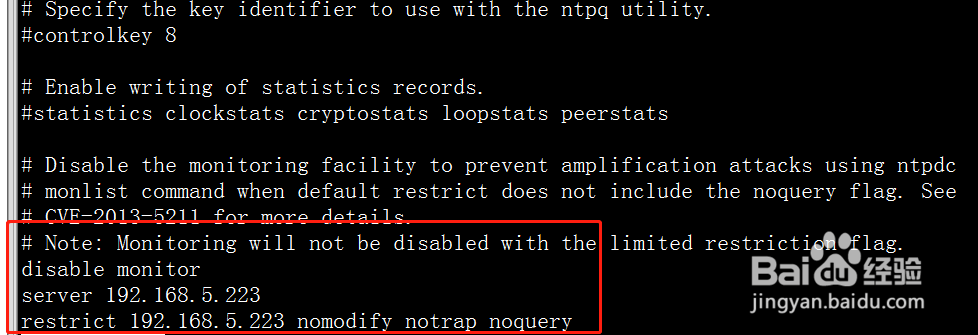
修改ntp.conf文件,配置server为刚才设置的服务器hdp1的ip,并增加restrict配置
vi /etc/ntp.conf
server 192.168.5.223
restrict 192.168.5.223 nomodify notrap noquery
重启
service ntpd start
12、SSH无密码登陆(所有节点)
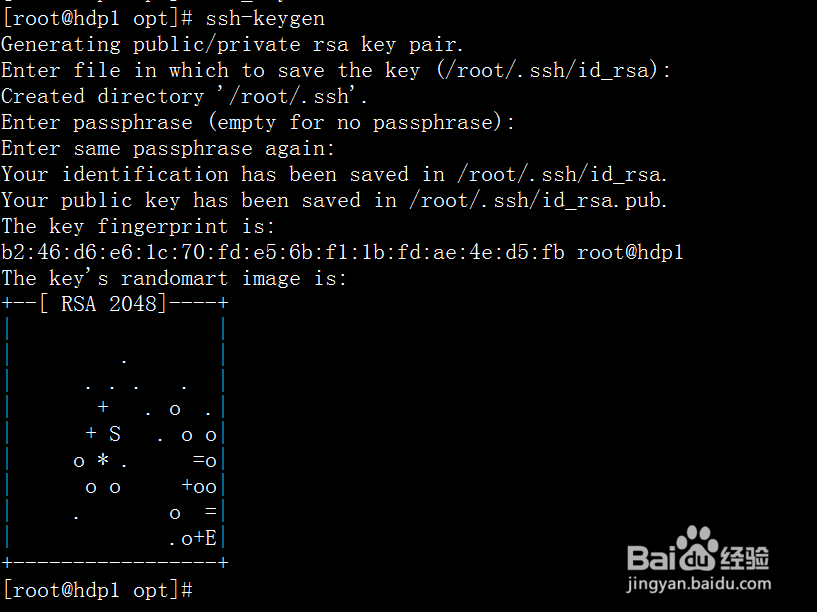
执行ssh-keygen
一路回车
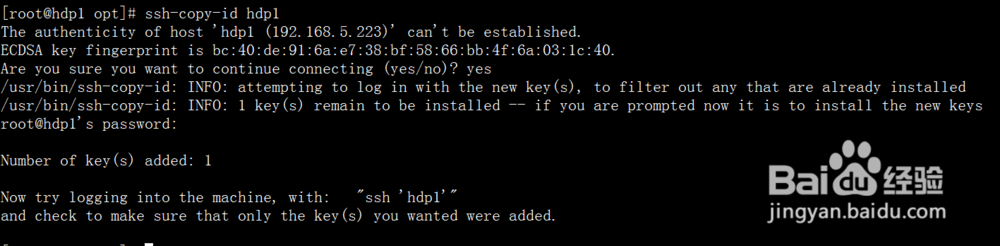
ssh-copy-id hdp1
ssh-copy-id hdp2
ssh-copy-id hdp3
按照提示输入密码,
所有机器执行以上指令
13、修改yum源,实现离线安装
安装httpd服务(主服务器)
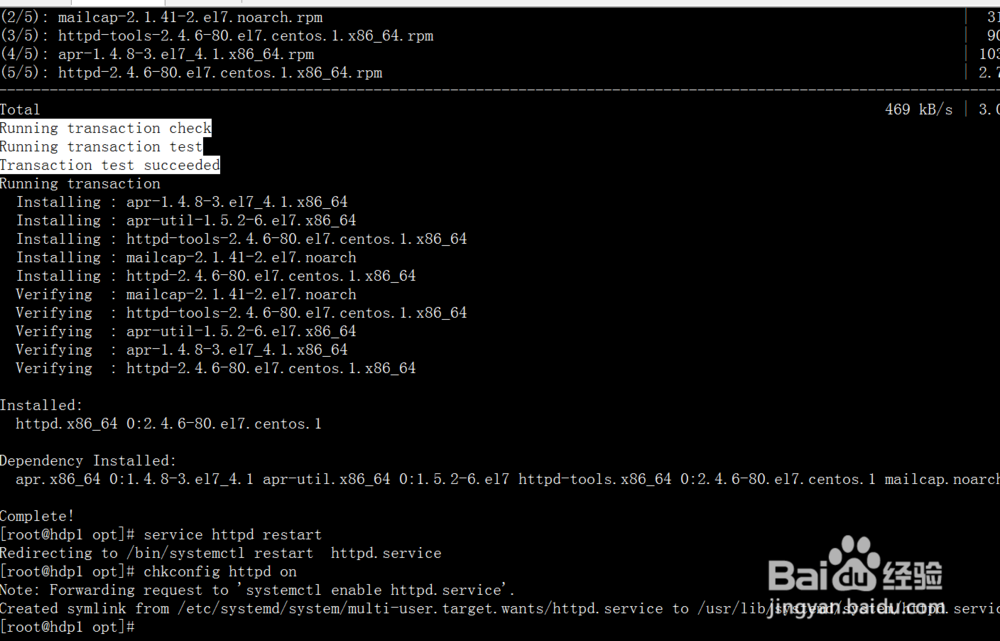
yum -y install httpd
service httpd restart
chkconfig httpd on
14、将HDP-UTILS-1.1.0.21-centos7.tar.gz,
HDP-2.6.3.0-centos7-rpm.tar.gz,
ambari-2.6.0.0-centos7.tar.gz
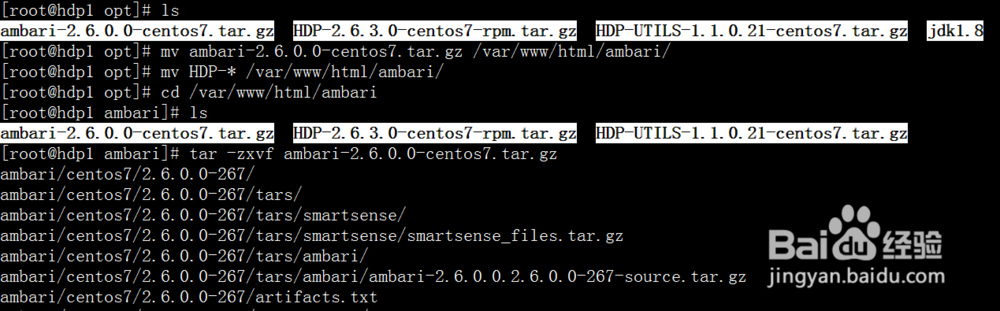
从/opt移到/var/www/html/ambari目录
mv ambari-2.6.0.0-centos7.tar.gz /var/www/html/ambari/
mv HDP-* /var/www/html/ambari/
cd /var/www/html/ambari
tar -zxvf ambari-2.6.0.0-centos7.tar.gz
tar -zxvf HDP-2.6.3.0-centos7-rpm.tar.gz
mkdir HDP-UTILS
tar -zxvf HDP-UTILS-1.1.0.21-centos7.tar.gz -C HDP-UTILS
rm -rf ambari-2.6.0.0-centos7.tar.gz HDP-2.6.3.0-centos7-rpm.tar.gz HDP-UTILS-1.1.0.21-centos7.tar.gz
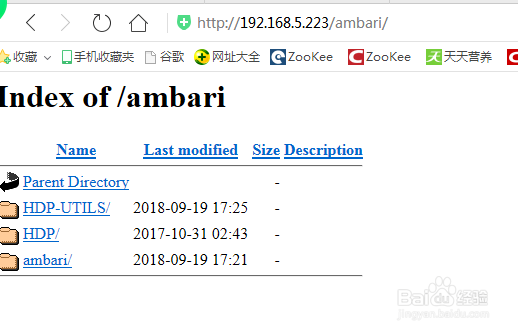
15、通过访问http://192.168.5.223/ambari/查看是否能成功访问
16、制作本地源
安装本地源制作相关工具(主服务器)
yum install yum-utils createrepo yum-plugin-priorities -y
cd /var/www/html/ambari
createrepo ./
修改文件里面的源地址(主服务器)
vi ambari/centos7/2.6.0.0-267/ambari.repo
#VERSION_NUMBER=2.6.0.0-267
[ambari-2.6.0.0]
name=ambari Version - ambari-2.6.0.0
baseurl=http://hdp1/ambari/ambari/centos7/2.6.0.0-267
gpgcheck=1
gpgkey=http://hdp1/ambari/ambari/centos7/2.6.0.0-267/RPM-GPG-KEY/RPM-GPG-KEY-Jenkins
enabled=1
priority=1
17、cp ambari/centos7/2.6.0.0-267/ambari.repo /etc/yum.repos.d/
vi HDP/centos7/2.6.3.0-235/hdp.repo
#VERSION_NUMBER=2.6.3.0-235
[HDP-2.6.3.0]
name=HDP Version - HDP-2.6.3.0
baseurl=http://hdp1/ambari/HDP/centos7/2.6.3.0-235
gpgcheck=1
gpgkey=http://hdp1/ambari/HDP/centos7/2.6.3.0-235/RPM-GPG-KEY/RPM-GPG-KEY-Jenkins
enabled=1
priority=1
[HDP-UTILS-1.1.0.21]
name=HDP-UTILS Version - HDP-UTILS-1.1.0.21
baseurl=http://hdp1/ambari/HDP-UTILS
gpgcheck=1
gpgkey=http://hdp1/ambari/HDP-UTILS/RPM-GPG-KEY/RPM-GPG-KEY-Jenkins
enabled=1
priority=1
18、cp HDP/centos7/2.6.3.0-235/hdp.repo /etc/yum.repos.d/
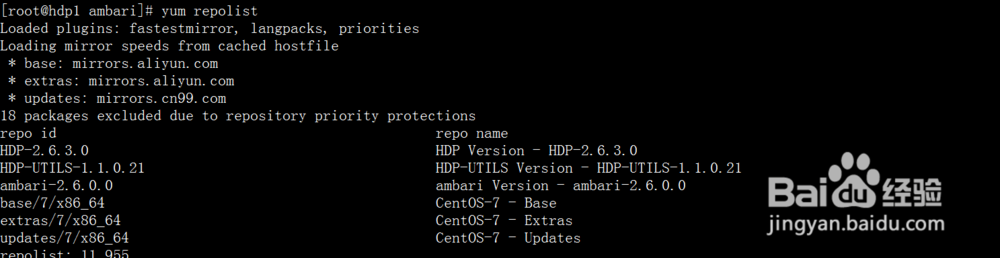
上面就创建好了主机上的文件,然后可以通过下面命令清楚一下yum的缓存就可以了
yum clean all
yum makecache
yum repolist
19、将创建好的文件拷贝到子节点
cd /etc/yum.repos.d
scp ambari.repo hdp2:/etc/yum.repos.d/
scp ambari.repo hdp3:/etc/yum.repos.d/
scp hdp.repo hdp3:/etc/yum.repos.d/
scp hdp.repo hdp2:/etc/yum.repos.d/

20、安装ambari-server
默认安装方式,使用默认数据库PostgreSQL(不推荐生产环境使用)(主服务器)
yum -y install ambari-server
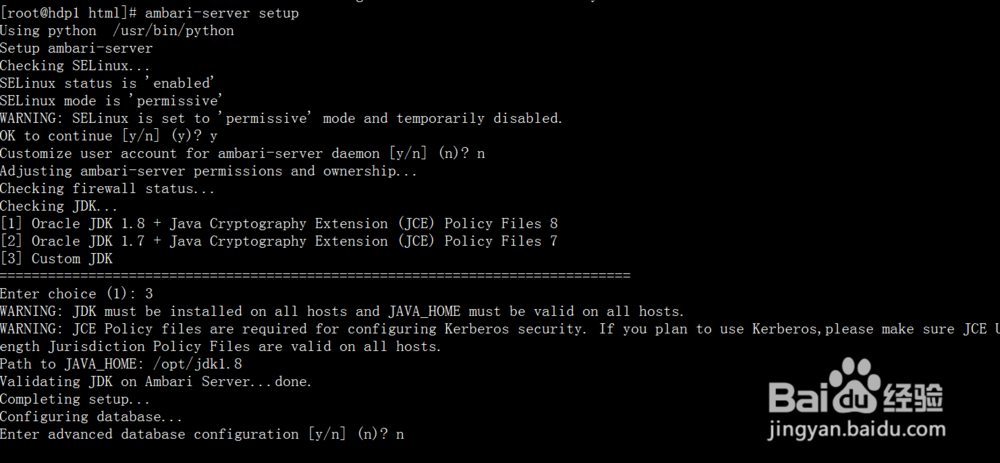
ambari-server setup
21、[root@hdp1 html]# ambari-server setup
Using python /usr/bin/python
Setup ambari-server
Checking SELinux...
SELinux status is 'enabled'
SELinux mode is 'permissive'
WARNING: SELinux is set to 'permissive' mode and temporarily disabled.
OK to continue [y/n] (y)? y
Customize user account for ambari-server daemon [y/n] (n)? n
Adjusting ambari-server permissions and ownership...
Checking firewall status...
Checking JDK...
[1] Oracle JDK 1.8 + Java Cryptography Extension (JCE) Policy Files 8
[2] Oracle JDK 1.7 + Java Cryptography Extension (JCE) Policy Files 7
[3] Custom JDK
==============================================================================
Enter choice (1): 3
WARNING: JDK must be installed on all hosts and JAVA_HOME must be valid on all hosts.
WARNING: JCE Policy files are required for configuring Kerberos security. If you plan to use Kerberos,please make sure JCE Unlimited Strength Jurisdiction Policy Files are valid on all hosts.
Path to JAVA_HOME: /opt/jdk1.8
Validating JDK on Ambari Server...done.
Completing setup...
Configuring database...
Enter advanced database configuration [y/n] (n)? n
22、启动ambari
ambari-server start
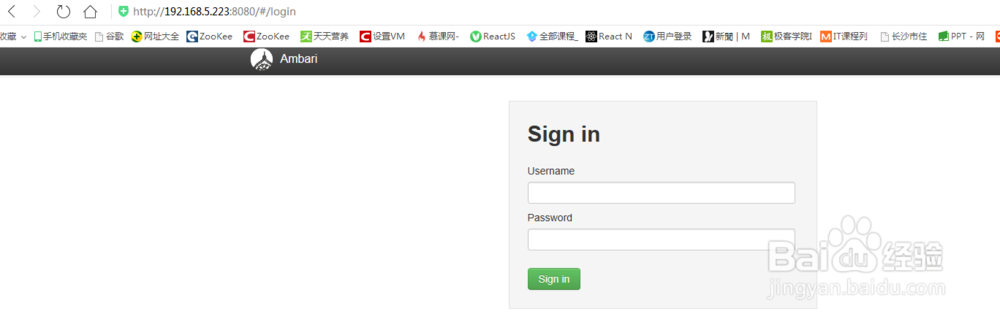
成功启动后在浏览器输入Ambari地址:
http://192.168.5.223:8080/
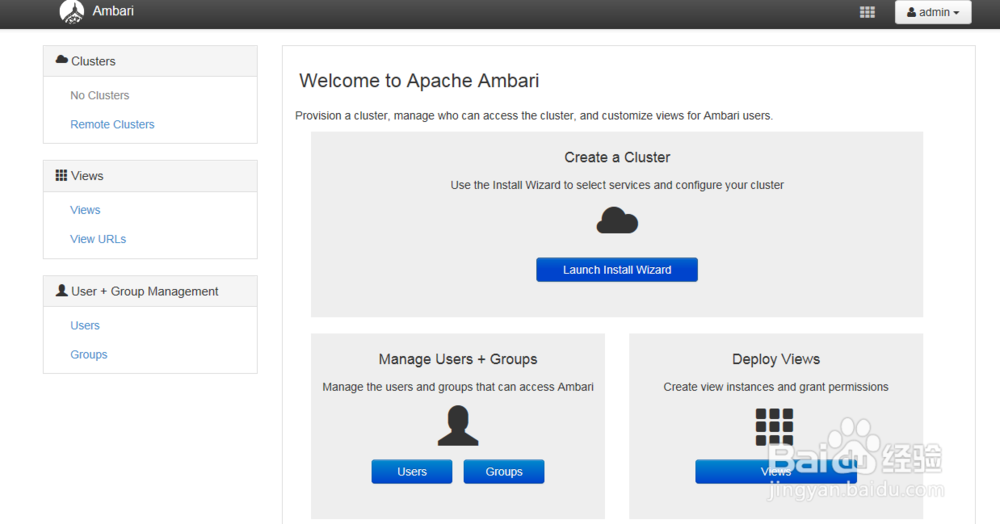
23、安装配置部署HDP集群
登录界面,默认管理员账户登录, 账户:admin 密码:admin
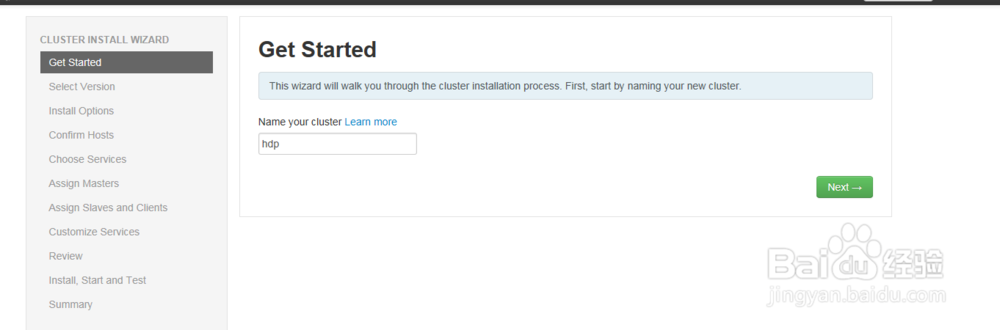
24、安装向导
配置集群的名字为hdp
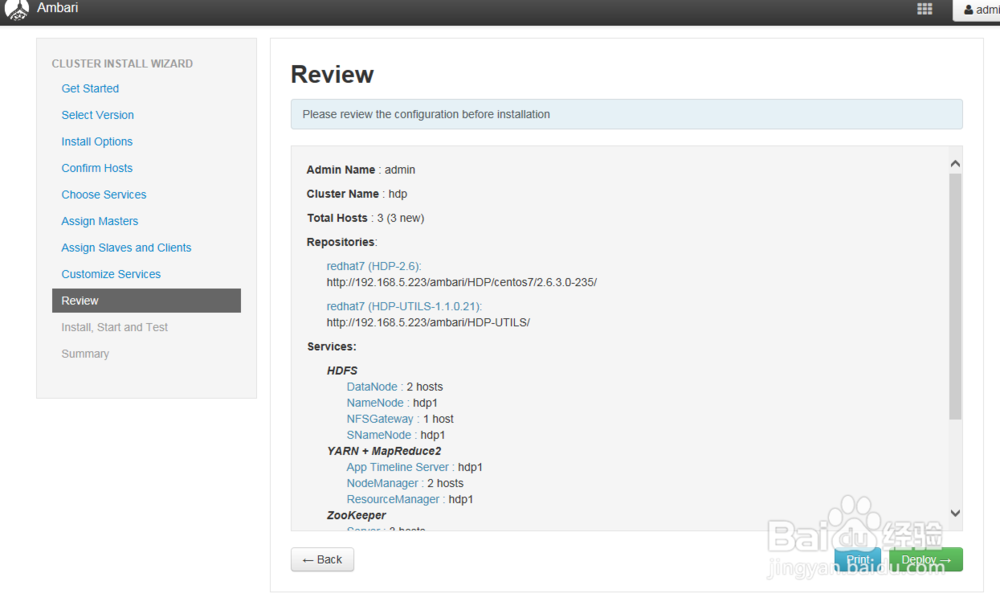
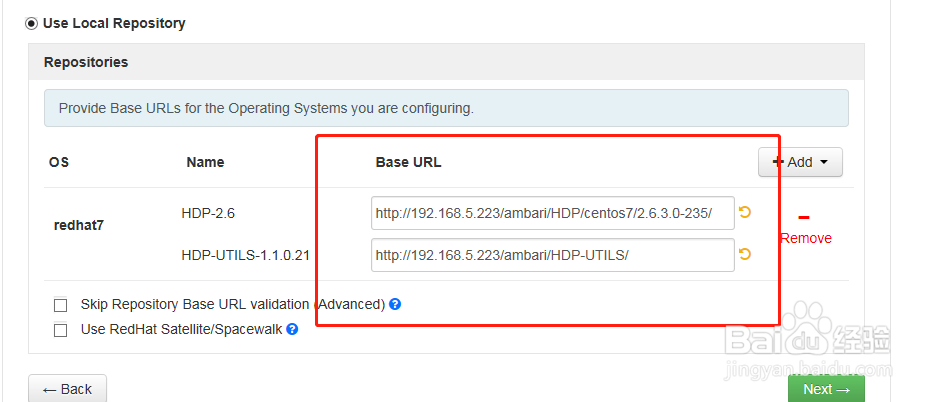
25、选择版本并修改为本地源地址
os选择redhat7
分别输入:
http://192.168.5.223/ambari/HDP/centos7/2.6.3.0-235/
http://192.168.5.223/ambari/HDP-UTILS/
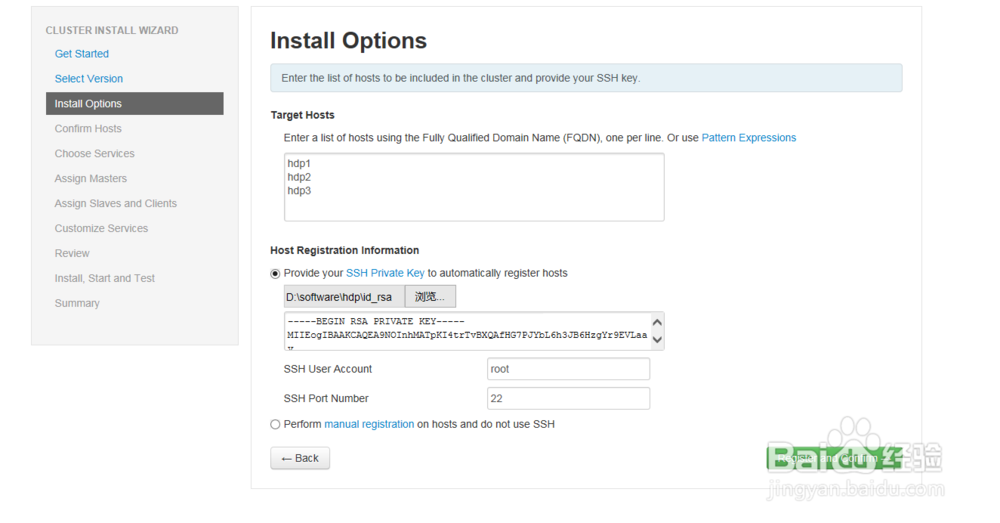
26、选择要安装的服务器和上传上面教程所拷贝出来的秘钥文件id_rsa
27、安装ambari的agent,同时检查系统问题
如果这里出了问题,请检查上面所有的步骤有没有遗漏和未设置的参数。同时在重新修改了配置以后,最好是重置ambari-server来重新进行安装
ambari-server stop
ambari-server reset #重置命令
ambari-server setup #重新设置
ambari-server start
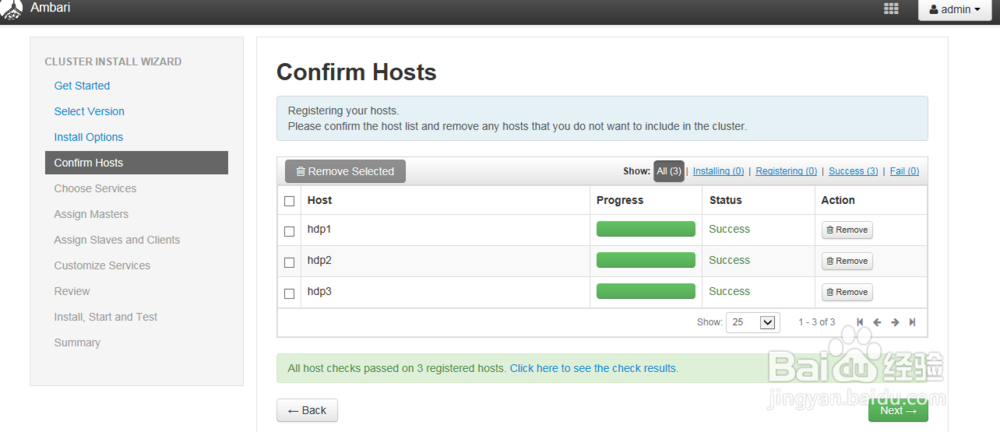
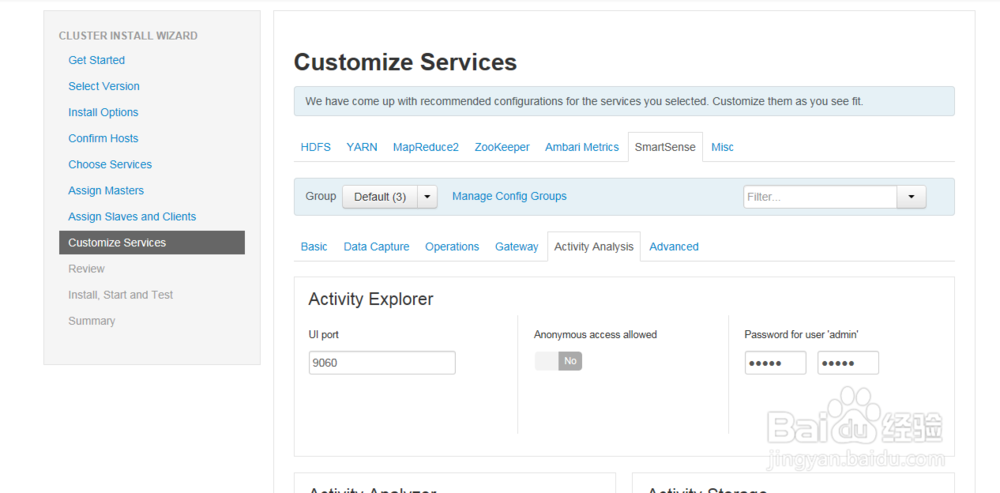
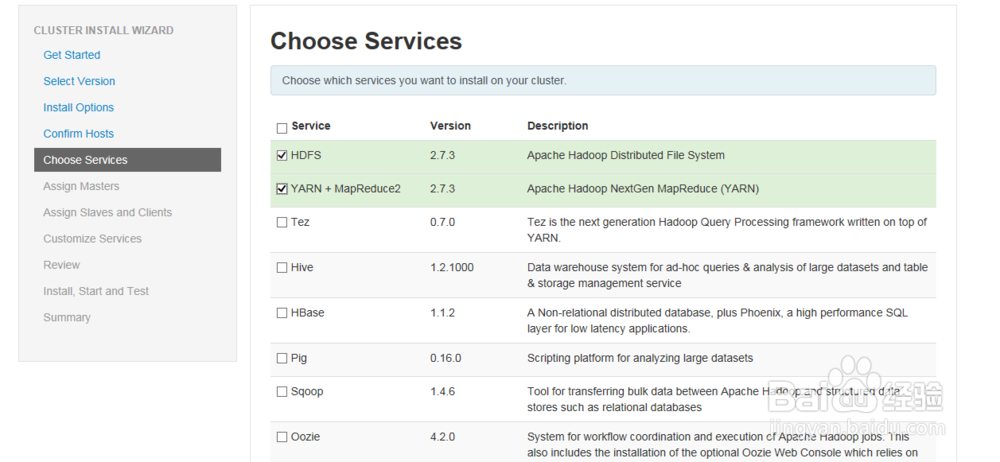
28、选择要安装的服务,这里我只选择最基本的,其他的可以装好了再添加,以减少安装过程中的异常。有些必须安装的,点next会提示安装
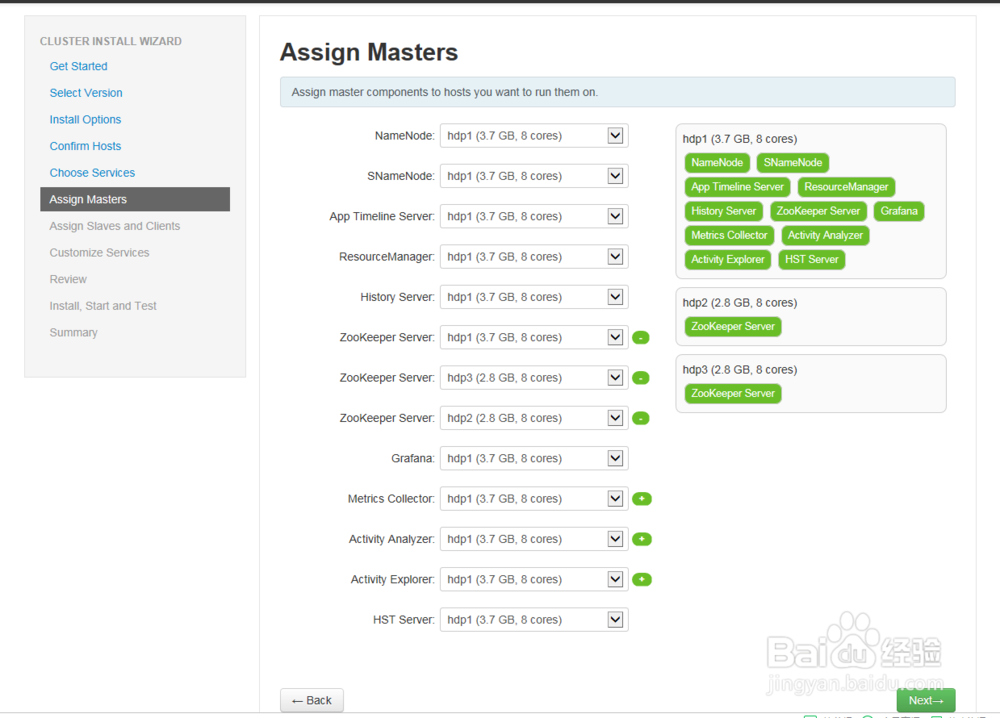
29、选择分配服务
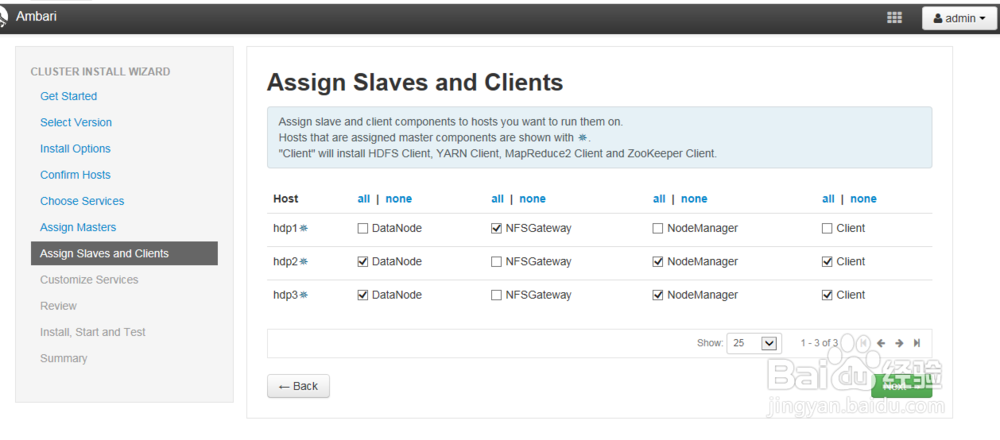
30、选择nodemanager、regionserver、client
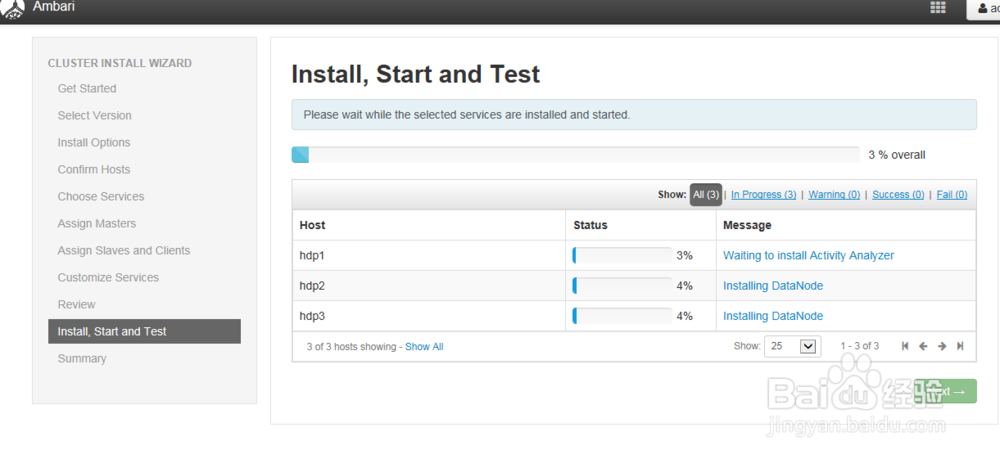
31、接下来就是ambari-server自动帮你安装。中途可能会遇到一些错误,特别是重装时更容易遇见,主要包括以下方面
1)某个版本的包找不到,告诉大家2个指令查找是否已经安装了,如:
raise Fail("Cannot match package for regexp name {0}. Available packages: {1}".format(name, self.available_packages_in_repos)) resource_management.core.exceptions.Fail: Cannot match package for regexp name hadoop_${stack_version}-mapreduce
解决方法:
yum list installed | grep XXX =>某个包是否已经安装了,
执行yum remove -y XXX 先移除掉
yum list available | grep XXX 某个包是否确定不存在
排查办法:更新yum仓库,hdp.repos等文件的baseurl是否写错了。
2)ssl版本校验问题
3)磁盘内存空间问题,会出现一些看不懂的错误。
上述异常错误的解决办法,在我的其他文章都已经写好了。各位作为参照解决的办法。