PotPlayer怎么关闭在底部显示时间
1、首先打开一个PotPlayer界面中

2、然后点击PotPlayer菜单中的更多菜单

3、弹出了下拉菜单选中为选项
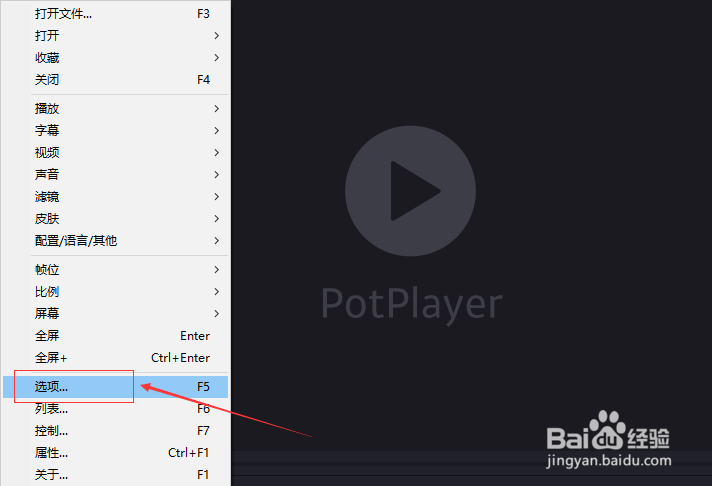
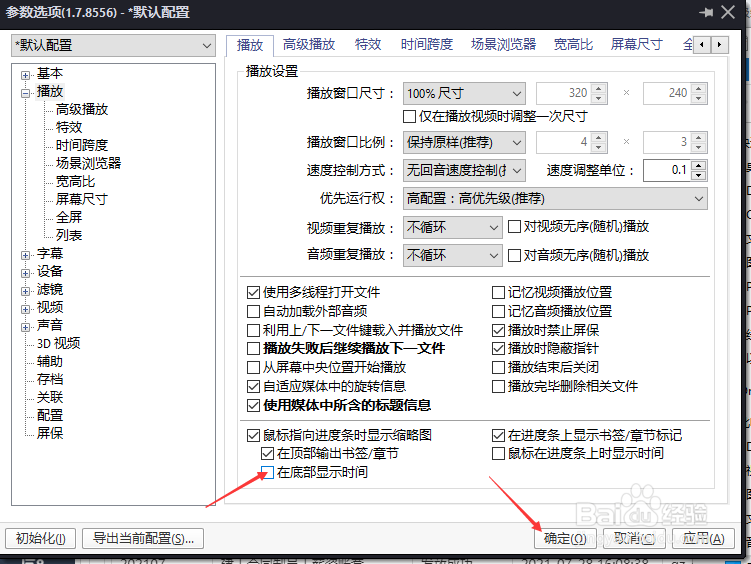
4、点击播放选项

5、去掉勾选在底部显示时间选项

6、去掉勾选在底部显示时间选项之后,点击确定
阅读量:171
阅读量:73
阅读量:70
阅读量:81
阅读量:92
1、首先打开一个PotPlayer界面中
2、然后点击PotPlayer菜单中的更多菜单
3、弹出了下拉菜单选中为选项
4、点击播放选项
5、去掉勾选在底部显示时间选项
6、去掉勾选在底部显示时间选项之后,点击确定