win10炉石传说pc端黑屏
1、炉石 heartstone 调成省电模式
桌面右击,点击配置可交换显卡点击应用程序配置,将炉石 heartstone 调成省电模式即可。

1、选择 power saving模式
选择系统,可切换显卡,选择 power saving模式即可。
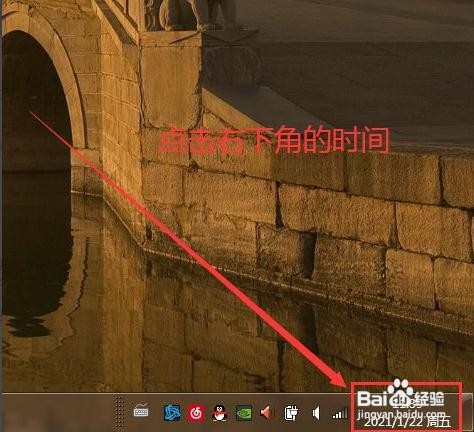
1、点击时间
点击电脑右下角的时间。
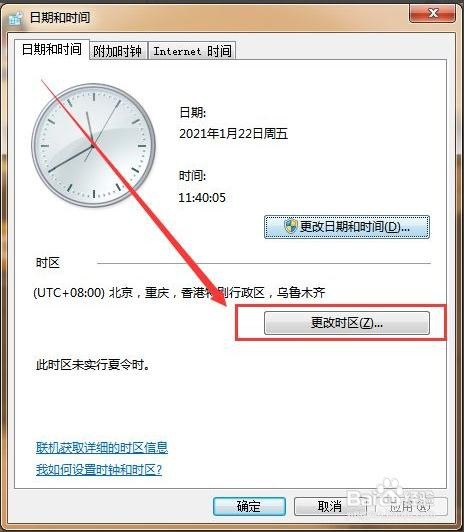
2、点击更改日期和时间
点击更改日期和时间设置。

3、点击更改时区
点击更改时区。
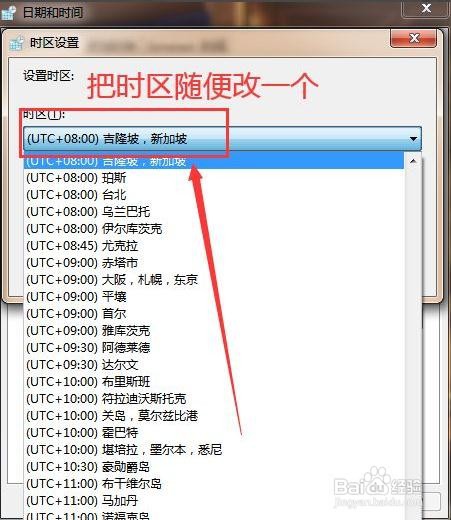
4、选择时区
选一个时区,点击确定即可。
阅读量:91
阅读量:84
阅读量:132
阅读量:64
阅读量:90