IntelliJ IDEA关闭检测使用现文件缩进进行编辑
1、首先,打开一个的IntelliJ IDEA的代码工具界面中

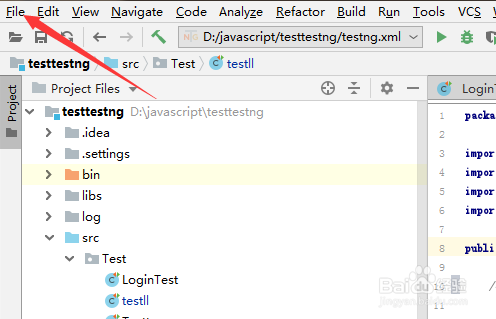
2、进入到了的IntelliJ IDEA的,点击左上角中的 file 菜单
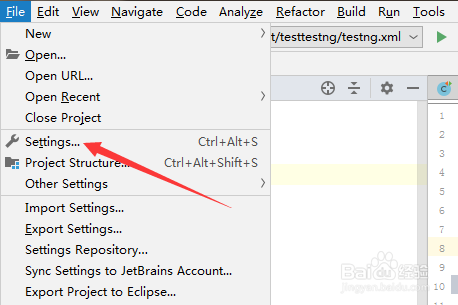
3、点击了file菜单之后,弹出了下拉菜单选中为 settings 选项
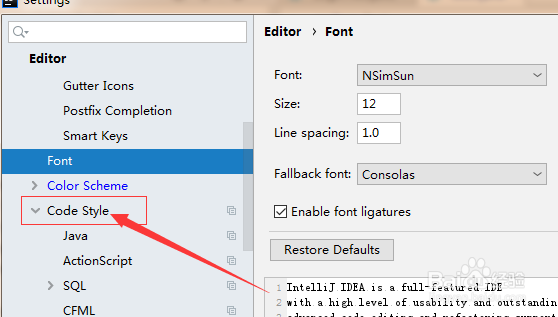
4、进入到了settings界面中,选中左侧汇总的 code style 选项
5、选中左侧汇总的 code style 选项之后,去掉 delect and use existing file indenets for editing 选项
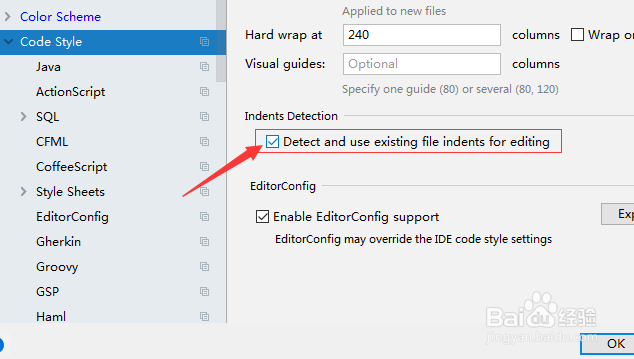
6、去掉 delect and use existing file indenets for editing 选项之后,点击 ok 来保存当前的设置。

阅读量:127
阅读量:61
阅读量:176
阅读量:168
阅读量:172