Windows7如何备份
1、点击桌面左下角win键,点击控制面板


2、点击图中所指的系统和安全安全


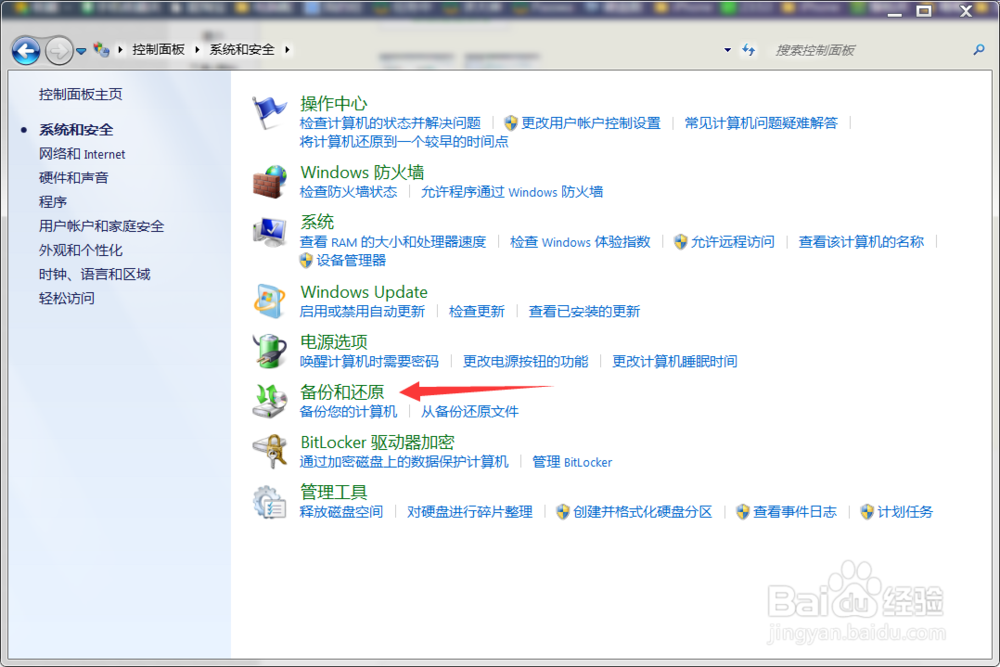
3、点击图中所指的备份和还原

4、点击设置备份


5、以存放f盘为例,点击下一步


6、点击下一步


7、最后点击右下角保存设置并运行备份即可

8、返回备份和恢复的主页面就有了备份文件

阅读量:144
阅读量:158
阅读量:122
阅读量:129
阅读量:52
1、点击桌面左下角win键,点击控制面板
2、点击图中所指的系统和安全安全
3、点击图中所指的备份和还原
4、点击设置备份
5、以存放f盘为例,点击下一步
6、点击下一步
7、最后点击右下角保存设置并运行备份即可
8、返回备份和恢复的主页面就有了备份文件